01 / MOTION SOURCE
Source video
Ammar’s generated scene, ready to recast with your identity.
Download video ↓MP4 · 30 sec · 720p · 35.6 MB
Same movement. Same camera.
A whole new cast.
Starring you.
Rebuild the reference scene with your own identity. Make three clear character views, then bring them together in Genjutsu.
Using the free Genjutsu generation? Treat it as your final attempt: review every file, image order and prompt before you press Generate.
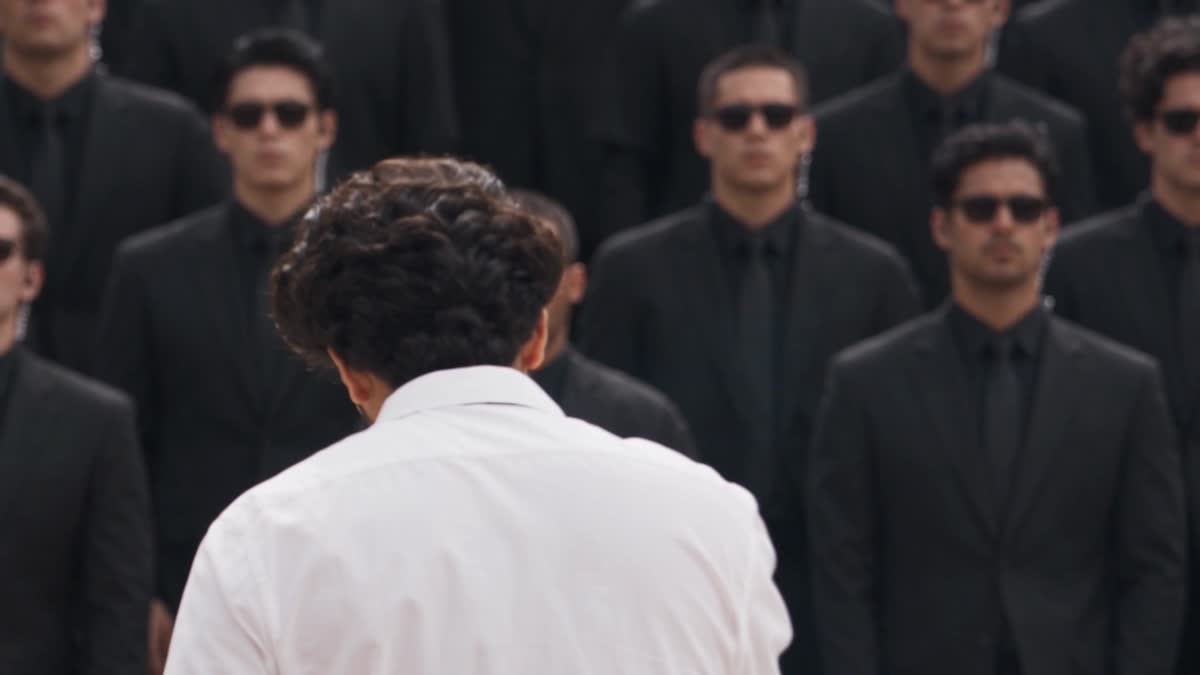
Watch Ammar’s AI-generated scene, then use this exact video as your motion source. Replace the white-shirt performer with your own identity while preserving the choreography, camera movement and surrounding guards.
Follow the white-shirt performer through the cigarette gestures, turns and guard formation. Preserve the smoke, camera pull-back and each guard’s movement. The prompt below is written for this exact video.
Download source MP4 ↙Jump to a moment in the source. These are review landmarks; the full video controls the exact timing.
Upload several clear, existing photos of yourself to an image-generation model that accepts reference images. These establish your identity; the three images you generate next are the final character inputs for Higgsfield.
Choose enough resolution to see your facial structure clearly. Use the same original photographs throughout.
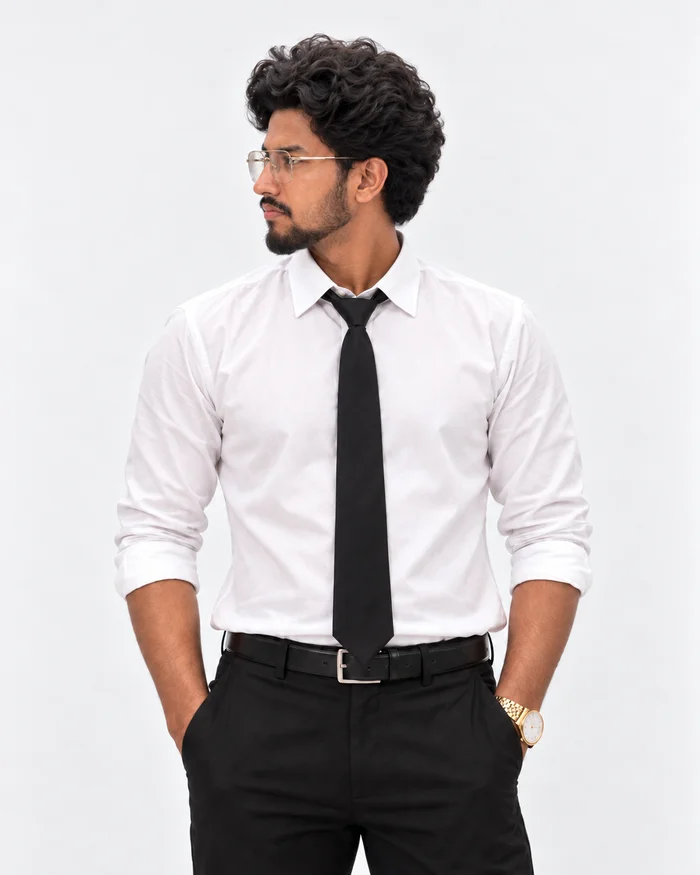
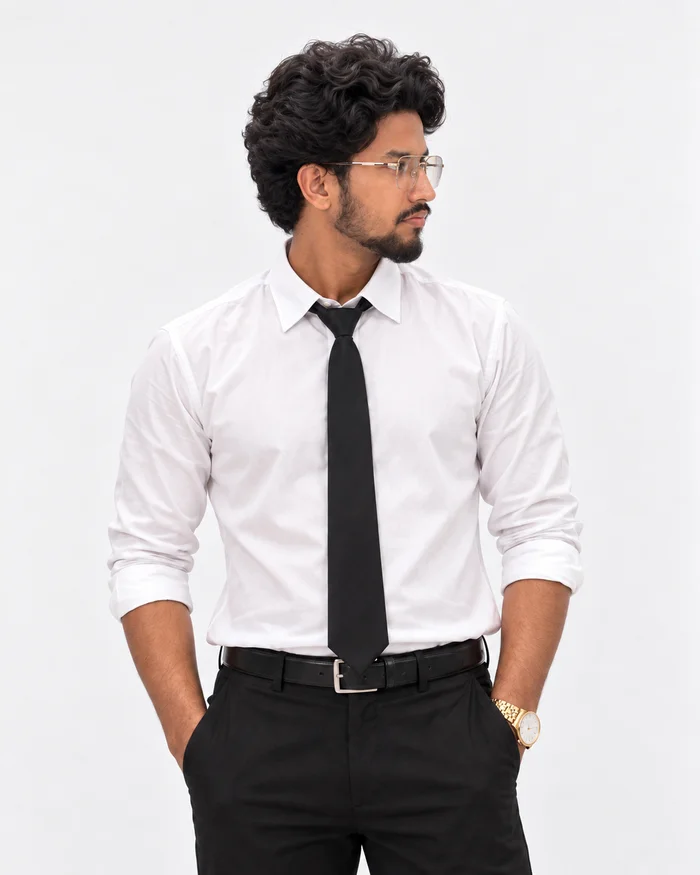
This step creates the three clear, consistent views that tell AI exactly who your character is. If you already have sharp, full-body front, left and right images of your character, you can skip this step and use those instead.
Your approved front view sets the clothing and styling for every other view.
Want a different outfit? Replace only the WARDROBE section of all three character prompts with your preferred clothing. Keep the outfit description identical across the front, left and right references. Also update the matching outfit descriptions in the final video prompt.
Before continuing: check likeness, hands, feet, framing and a straight-on pose.
IDENTITY-PRESERVING CHARACTER REFERENCE — FRONT VIEW

Use all uploaded photographs of the subject as authoritative identity references.

Generate one new photorealistic full-body character reference of the SAME PERSON.

IDENTITY PRESERVATION IS THE HIGHEST PRIORITY.

Preserve the subject's real:
- facial geometry
- face width and length
- jaw and chin structure
- eyes and eye spacing
- eyebrows
- nose shape and proportions
- lips
- ears
- hairline
- natural skin tone
- hairstyle
- facial hair, if present
- body proportions
- apparent age
- overall recognizable likeness

Do not beautify, reinterpret, stylize, masculinize, feminize or redesign the person's identity.

The result must look unmistakably like the person in the uploaded reference photographs rather than an AI-created look-alike.

WARDROBE:
Dress the subject in:
- clean fitted white dress shirt
- plain black necktie
- tailored black trousers
- simple black belt
- black dress shoes

Keep the styling elegant, minimal and realistic.

POSE:
- true front-facing view
- head facing directly toward camera
- torso facing directly toward camera
- natural upright posture
- relaxed arms
- calm, neutral/confident expression
- no exaggerated fashion pose

COMPOSITION:
- vertical 9:16 image
- show the entire body from hair to shoes
- subject centered
- leave a small amount of breathing room above the head and below the shoes
- do not crop the hands, feet, hair or clothing
- avoid wide-angle distortion

BACKGROUND:
Use a plain seamless white or very light neutral studio background with clear separation between subject and background.

LIGHTING:
Use soft, balanced studio lighting.
The entire face must be clearly visible.
Avoid harsh shadows, colored lighting and blown highlights.

IMAGE QUALITY:
Photorealistic.
High resolution.
Sharp facial detail.
Sharp hair detail.
Natural skin texture.
Realistic fabric texture.
No artificial skin smoothing.

DO NOT:
change facial structure,
change skin tone,
change hairstyle unnecessarily,
change facial hair,
change body proportions,
add accessories not visible in the identity references,
crop the subject,
generate a three-quarter pose,
or create a stylized/cartoon appearance.

FINAL REQUIREMENT:
This image will be used as an identity reference for AI video generation. Facial accuracy and identity consistency are more important than artistic interpretation.
Upload your original photographs and your approved front reference. The nose must point to the left edge of the final image.
A true profile means head and torso turn together. Keep the face, hair, outfit and body proportions consistent.
Before continuing: check likeness, hands, feet, framing and a true 90° side view.
IDENTITY-PRESERVING CHARACTER REFERENCE — LEFT PROFILE

Using the uploaded identity photographs and the approved front character reference, generate the SAME PERSON again with the SAME wardrobe, body proportions, hairstyle, facial features, skin tone and overall identity.

The front character reference establishes the approved styling and clothing.
The original identity photographs remain authoritative for facial identity.

Generate a TRUE 90-DEGREE LEFT PROFILE.

ORIENTATION:
The subject's NOSE must point toward the LEFT SIDE OF THE FINAL IMAGE.

The head and torso should both face left.

Do not generate a three-quarter angle.
Do not rotate the eyes back toward camera.
Do not alter the face simply to make the profile more aesthetically pleasing.

IDENTITY:
Preserve the same:
- skull and facial structure
- forehead
- brow
- nose profile
- lips
- chin
- jaw
- ears
- hairline
- hairstyle
- facial hair, if present
- skin tone
- apparent age
- body proportions

WARDROBE:
Keep exactly the same clothing as the approved front reference:
- white dress shirt
- black necktie
- tailored black trousers
- black belt
- black dress shoes

POSE AND COMPOSITION:
- natural upright stance
- true side profile
- entire body visible from hair to shoes
- centered in frame
- vertical 9:16
- small comfortable margins around the body
- no cropped feet or head

BACKGROUND AND LIGHTING:
Match the front reference:
- plain white/light-neutral seamless background
- balanced studio lighting
- clear separation from background
- sharp facial and hair detail
- realistic skin and fabric texture

DO NOT:
change identity,
change outfit,
change hairstyle,
change facial hair,
change body proportions,
create a three-quarter view,
make the subject look toward camera,
or stylize the result.

FINAL REQUIREMENT:
This must look like the same real person from the front reference photographed from a true left-side angle.
Use the original photographs and the same approved front reference again. The nose must point to the right edge of the final image.
A true profile means head and torso turn together. Keep the face, hair, outfit and body proportions consistent.
Before continuing: check likeness, hands, feet, framing and a true 90° side view.
IDENTITY-PRESERVING CHARACTER REFERENCE — RIGHT PROFILE

Using the uploaded identity photographs and the approved front character reference, generate the SAME PERSON again with the SAME wardrobe, body proportions, hairstyle, facial features, skin tone and overall identity.

The front character reference establishes the approved styling and clothing.
The original identity photographs remain authoritative for facial identity.

Generate a TRUE 90-DEGREE RIGHT PROFILE.

ORIENTATION:
The subject's NOSE must point toward the RIGHT SIDE OF THE FINAL IMAGE.

The head and torso should both face right.

Do not generate a three-quarter angle.
Do not rotate the eyes back toward camera.
Do not alter the face simply to make the profile more aesthetically pleasing.

IDENTITY:
Preserve the same:
- skull and facial structure
- forehead
- brow
- nose profile
- lips
- chin
- jaw
- ears
- hairline
- hairstyle
- facial hair, if present
- skin tone
- apparent age
- body proportions

WARDROBE:
Keep exactly the same clothing as the approved front reference:
- white dress shirt
- black necktie
- tailored black trousers
- black belt
- black dress shoes

POSE AND COMPOSITION:
- natural upright stance
- true side profile
- entire body visible from hair to shoes
- centered in frame
- vertical 9:16
- small comfortable margins around the body
- no cropped feet or head

BACKGROUND AND LIGHTING:
Match the front reference:
- plain white/light-neutral seamless background
- balanced studio lighting
- clear separation from background
- sharp facial and hair detail
- realistic skin and fabric texture

DO NOT:
change identity,
change outfit,
change hairstyle,
change facial hair,
change body proportions,
create a three-quarter view,
make the subject look toward camera,
or stylize the result.

FINAL REQUIREMENT:
This must look like the same real person from the front reference photographed from a true right-side angle.
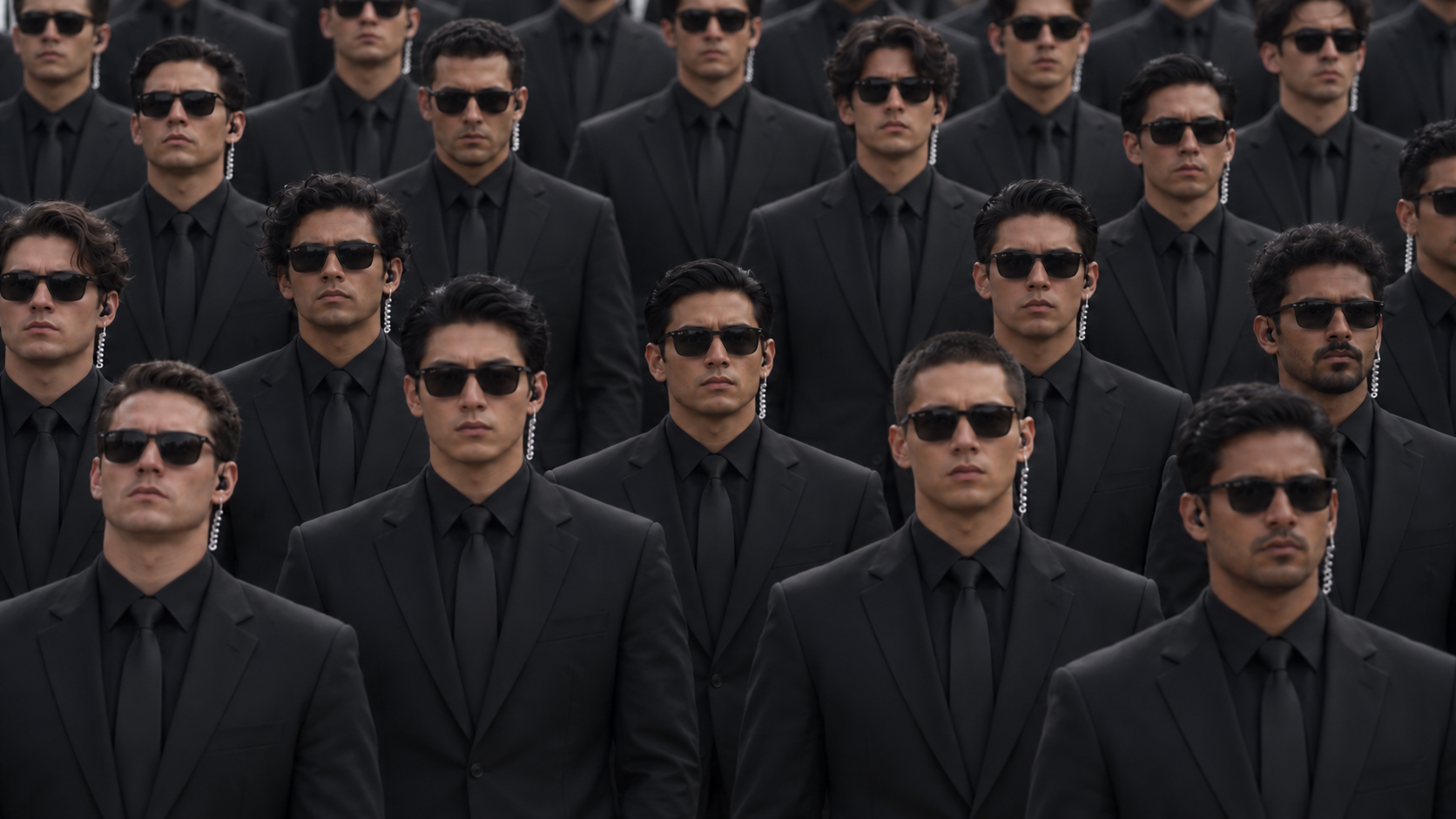
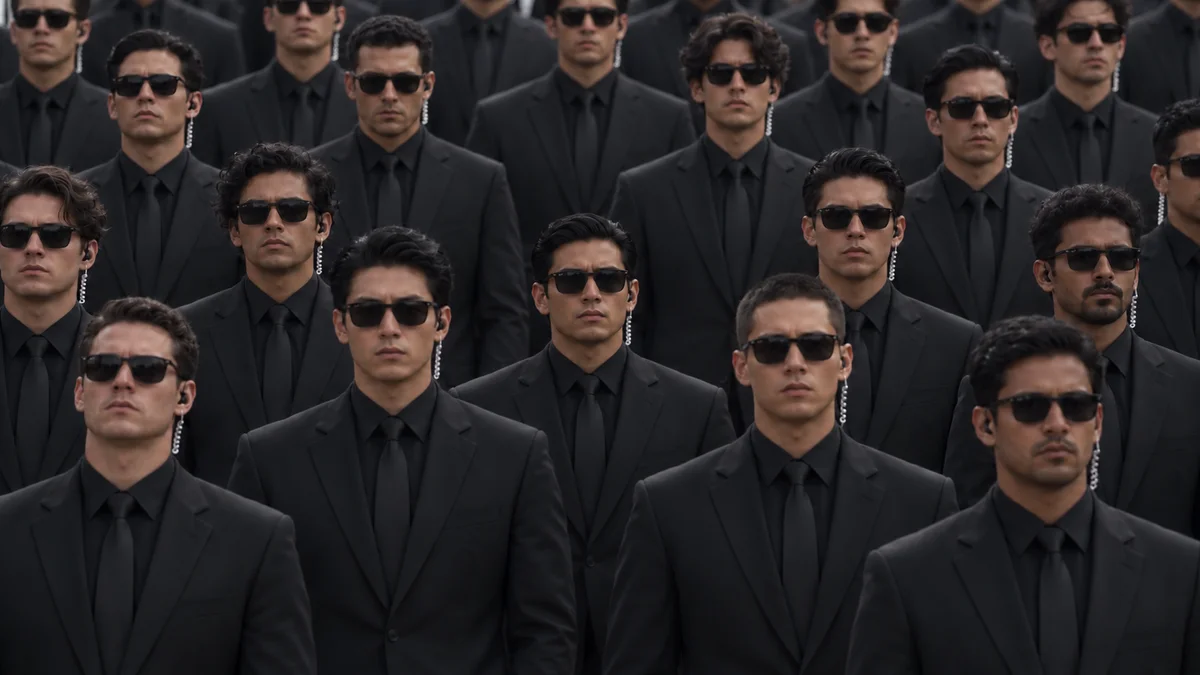
Download both files. Ammar’s video is your motion source; the guards image keeps the surrounding cast’s style consistent. Add your own three character references in the next step.
Ammar’s generated scene, ready to recast with your identity.
Download video ↓MP4 · 30 sec · 720p · 35.6 MB
Want a different surrounding cast? Replace this reference with your own crowd/style image, then edit only the SURROUNDING CROWD APPEARANCE section of the final prompt to describe your replacement characters. Keep the reference roles unchanged.
A shared uniform. Individually distinct faces.
Download guards ↓Original PNG · full resolutionCopy it now, then open Genjutsu with your source video and scene files prepared.
Open Genjutsu, select Motion transfer, and add the downloaded video as the motion reference. This workflow recasts the white-shirt performer in Ammar’s video as you. Add your three generated images followed by the guard image, in this exact order.
@image_1Your frontMain identity
@image_2Your leftNose points left
@image_3Your rightNose points right
@image_4The guardsCrowd style only
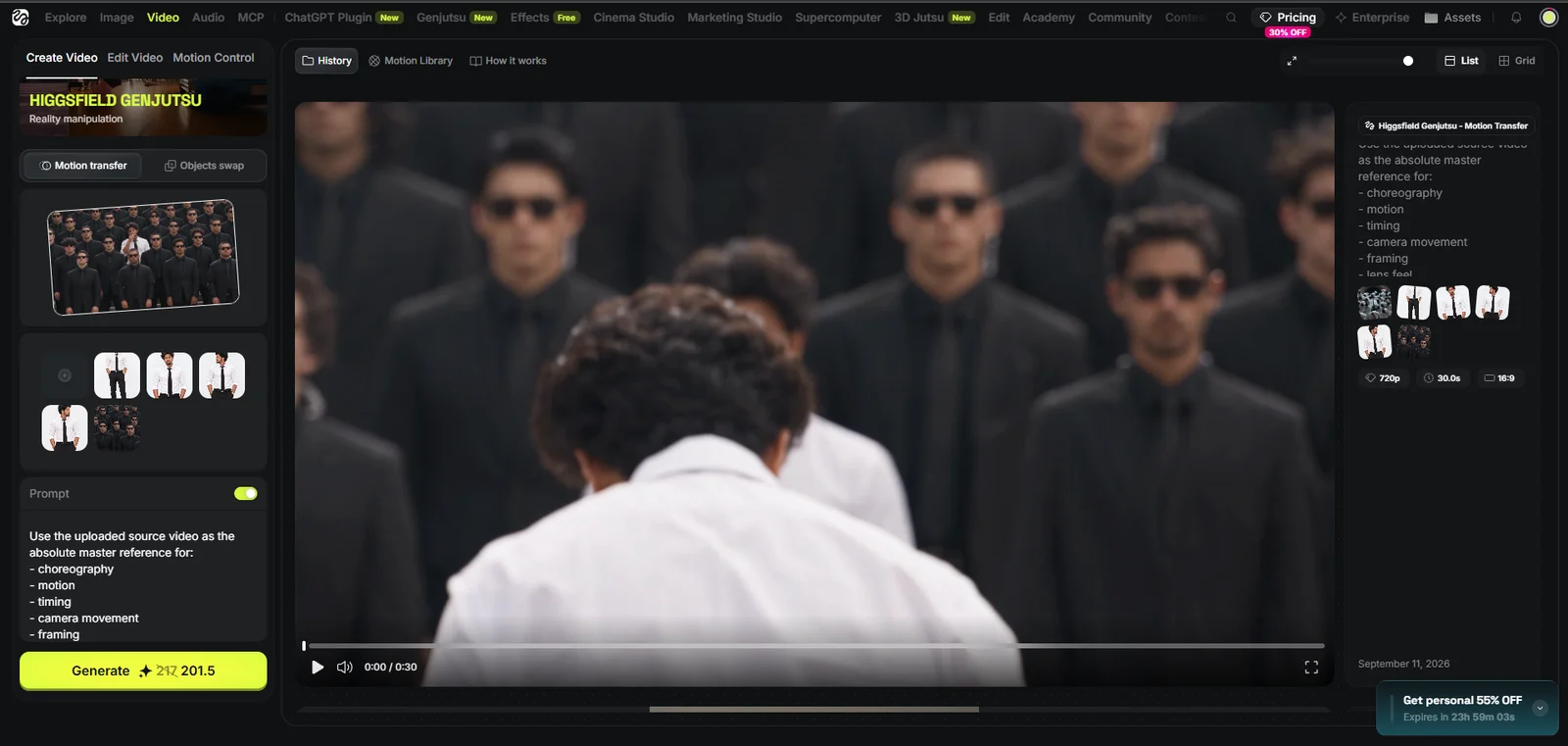
The supplied screenshot shows an earlier attempt and extra references. Follow the four-image map above, not the screenshot’s thumbnail count. It is an interface example; use the downloadable MP4 above as your motion source. Button layout may change. Official Genjutsu overview ↗
Enable Prompt, paste the complete prompt below, and check your reference assignments. Match the source aspect ratio and duration where available. Review the displayed credit cost before selecting Generate.
CHARACTER RECAST / SOURCE-ACTOR TRACKING

Use the uploaded SOURCE VIDEO as the absolute master reference for motion, choreography, timing, camera movement, framing, lens perspective, depth, occlusion, environment and shot progression.

This is a MAIN-SUBJECT IDENTITY REPLACEMENT task. Preserve the existing guard cast and scene.

SOURCE-SPECIFIC PERFORMANCE MAP — AMMAR'S SUPPLIED VIDEO

The uploaded source is already a generated scene. Use THIS uploaded video as the only motion and scene reference; no other original clip is required.

Observed sequence (approximate landmarks for orientation, never replacement keyframes or new timing):
- Opening: a tight front-facing view of the white-shirt performer with a cigarette held near the mouth in the right hand. Smoke is visible as the head lowers and turns. The guards behind are softer in focus.
- Early section: the same performer turns away from camera, showing the back of the white shirt, then moves deeper between the guard rows. Preserve the exact route, shoulder turns, arm lifts, hand gestures and changing occlusions.
- Middle section: the performer turns back toward camera within the formation, lowers the head, raises the cigarette hand toward the mouth again, then lowers the hand. Preserve the source's precise hand-to-mouth contact, pauses and head movement.
- Later section: the white-shirt performer remains comparatively upright while the surrounding guards begin their source-specific arm/lapel gestures, head rolls, leans and deep forward bows. The guards do not all occupy the same phase at once. Preserve each person's individual timing.
- Ending: the view has widened to show the performer, multiple rows of moving guards, stone steps, the large brick archway, pale stone trim and dark vertical panels. Retain the source's ending pose and frame; do not invent a new ending.

These descriptions help identify the source performance. The actual uploaded video is authoritative for every frame, movement, onset, duration, direction, camera change and detail. Do not substitute an approximation based on this text.

CIGARETTE / HAND / SMOKE CONTINUITY:
The cigarette is a performance prop, not part of the person's identity. Preserve it through the identity replacement.
Match the source hand (right hand where visible), finger grip, cigarette position, angle, scale, hand-to-mouth movement, mouth contact, lowering of the hand and subsequent visible holding position.
Preserve visible smoke at the source moments, with the same location, direction, density and dissipation as closely as possible.
Do not omit the cigarette, swap it between hands, turn it into another object, add a second cigarette, add extra smoking gestures or make it float independently of the hand.
When the hand or cigarette is occluded or outside the frame, preserve that visibility state; do not expose it for clarity or invent hidden action.
Maintain anatomically coherent fingers, lips and contact throughout.

CAMERA / ENVIRONMENT / LIGHTING:
Preserve the continuous widening from the close opening to the broad view of the formation and architecture. Match the actual source trajectory, rate of pull-back, perspective, focus changes and subject scale; do not invent a dolly, orbit, cut or zoom beyond what the source shows.
Keep the stair geometry, rows, brick arch, pale trim, dark panels, lighting direction, muted color palette, contact shadows and source depth of field. Do not replace the setting with a studio or the white image-reference background.


==================================================
REFERENCE MAP — DO NOT MIX THESE ROLES
==================================================

@image_1 = MAIN SUBJECT — front identity reference
@image_2 = SAME MAIN SUBJECT — left-profile identity reference
@image_3 = SAME MAIN SUBJECT — right-profile identity reference
@image_4 = SURROUNDING CROWD STYLE reference ONLY

@image_1, @image_2 and @image_3 show the SAME PERSON.

Use those three images together to maintain one consistent main identity across front-facing, profile, rear-facing, moving and partially occluded views.

@image_4 does NOT represent the main subject.
Never transfer facial identity from @image_4 onto the main subject.

==================================================
1. IDENTIFY AND TRACK SOURCE ACTOR A
==================================================

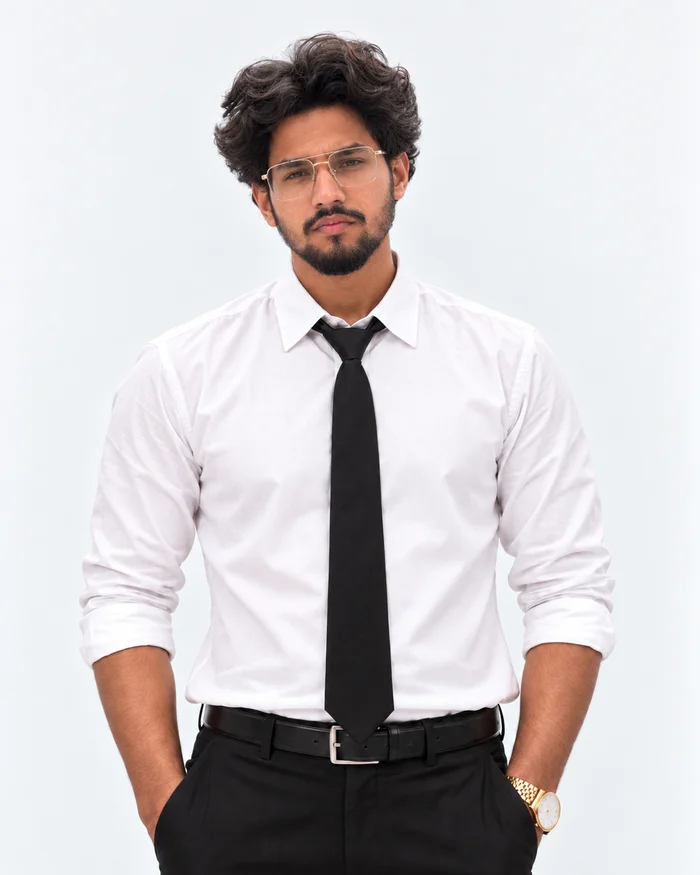
In the ORIGINAL SOURCE VIDEO, identify exactly ONE performer as SOURCE ACTOR A.

SOURCE ACTOR A is the original performer who:
- wears a white dress shirt and black necktie
- wears black trousers
- has dark wavy hair, facial hair and clear metal-framed eyeglasses
- holds a cigarette in the right hand and brings it toward the mouth
- wears rolled shirt sleeves and a wristwatch
- appears in a tight front-facing opening view, then turns their back toward camera
- moves through the surrounding crowd of black-suited guards wearing dark sunglasses

IMPORTANT:
These traits describe SOURCE ACTOR A ONLY so the correct original performer can be tracked.

THEY ARE NOT APPEARANCE INSTRUCTIONS FOR THE REPLACEMENT.

Do NOT copy SOURCE ACTOR A's:
- face
- hairstyle
- clothing
- body appearance
- identity

Track this exact ORIGINAL performer continuously throughout the entire source video.

Maintain the track when SOURCE ACTOR A:
- moves away from screen center
- turns sideways
- turns their back
- walks through the formation
- passes behind another performer
- becomes partially occluded
- becomes temporarily difficult to see
- changes depth within the crowd
- returns toward camera

NEVER identify the main character by whichever performer happens to occupy the center of the frame.

SOURCE ACTOR A is a continuous source-video identity track.

==================================================
2. REPLACE SOURCE ACTOR A WITH THE MAIN SUBJECT
==================================================

Replace SOURCE ACTOR A, and ONLY SOURCE ACTOR A, with the person represented by @image_1 + @image_2 + @image_3.

ABSOLUTE ONE-PERSON CONSTRAINT:

There must be EXACTLY ONE main-subject identity mapped to SOURCE ACTOR A.

The identity from @image_1–@image_3 is forbidden from appearing on any other performer.

Never:
- duplicate the main subject
- generate a second white-shirt version of the main subject
- place the main identity in both foreground and background
- assign the main identity to another performer after an occlusion
- create another main subject because a different performer enters screen center
- allow the main identity to leak into the surrounding crowd

If SOURCE ACTOR A is hidden, the replacement must also be hidden.

If SOURCE ACTOR A leaves a visible area, do not invent another copy elsewhere.

After every occlusion, reconnect the replacement to the SAME tracked SOURCE ACTOR A.

MAIN SUBJECT APPEARANCE:

Use ONLY @image_1, @image_2 and @image_3 to determine the main subject's identity.

Preserve:
- facial geometry
- facial proportions
- skin tone
- hairstyle
- facial hair if present
- body proportions
- apparent age
- recognizable likeness

Preserve the wardrobe shown in the generated subject references:

- white dress shirt
- black necktie
- tailored black trousers
- black belt
- black dress shoes

The white-shirt / black-tie outfit belongs ONLY to the main subject.

Keep the replacement’s accessories consistent with @image_1, @image_2 and @image_3. Do not inherit the source performer’s glasses unless they are also present in the replacement references.

Do NOT make the replacement resemble SOURCE ACTOR A.

Do NOT add sunglasses to the main subject unless sunglasses are clearly and consistently present in all three main-subject references.

MOTION LOCK:

The replacement must inherit SOURCE ACTOR A's exact:
- body position
- walking path
- body rotation
- head direction
- cigarette interaction, finger grip and hand-to-mouth contact
- visible smoke timing and motion
- gestures
- arm movement
- leg movement
- posture
- timing
- screen position
- scale
- depth
- occlusion

Do not alter the original performance simply to show the replacement's face.

If SOURCE ACTOR A faces away, the replacement must face away.

==================================================
3. PRESERVE EVERY OTHER HUMAN AS SOURCE GROUP B
==================================================

EVERY other human in the uploaded video belongs to SOURCE GROUP B: the existing black-suited guard crowd.

Preserve each guard as the same distinct source individual, with stable face, hair, skin tone, body build, clothing and accessories throughout. Do not unnecessarily regenerate or redesign their identities.

This applies to foreground performers, left and right edges, middle rows, rear rows, distant performers and partially visible performers.

@image_4 is a secondary appearance reference for the shared guard styling ONLY. It must not replace the source choreography, source arrangement or each guard's individual identity. Do not clone a face from @image_4 across the crowd.

If the video model reconstructs any surrounding performer, anchor the reconstruction to that SAME source guard, maintaining source likeness, position, depth, motion and continuity.

Never transfer the replacement main identity onto any guard.

==================================================
4. SURROUNDING CROWD APPEARANCE
==================================================

Maintain SOURCE GROUP B as the coordinated black-suited guard unit already visible in the uploaded video. Preserve the existing variation in their clothing and accessories; use @image_4 to reinforce the shared style, not to overwrite individual details.

Wardrobe and styling:
- fitted matte-black or charcoal suits
- black dress shirts
- black neckties
- black dress shoes
- dark sunglasses
- discreet clear communication earpieces
- polished, controlled, intimidating professional styling

NO weapons.
NO gun holsters.
NO firearms.
NO tactical weapons.

CRITICAL CROWD IDENTITY RULE:

Every surrounding performer must remain a DIFFERENT individual person.

They belong to the same organization but must NOT look like clones.

Preserve the existing natural variation between surrounding performers in:
- facial proportions
- jaw shape
- nose shape
- brows
- face width
- hairstyles
- hairlines
- skin tones
- body builds
- facial hair where appropriate

The shared uniform creates visual unity.
Their faces must remain individually distinct.

==================================================
5. PRESERVE EACH CROWD PERFORMER'S MOTION
==================================================

Track every guard as ONE specific original SOURCE GROUP B performer.

Each guard, including any reconstructed guard, must preserve that source performer's exact:
- position
- pose
- orientation
- head direction
- bow
- lean
- turn
- arm movement
- leg movement
- timing
- spacing
- scale
- depth
- occlusion

@image_4 defines APPEARANCE ONLY.

THE SOURCE VIDEO defines MOTION.

Do NOT freeze the agents into the standing pose visible in @image_4.

Do NOT force the agents to face camera when their corresponding source performers are turning, leaning or bowing.

Do NOT synchronize performers whose source movements are not synchronized.

==================================================
6. SOURCE VIDEO LOCK
==================================================

Preserve the source video's exact:
- camera trajectory
- camera movement
- zoom / pull-back progression
- framing progression
- shot duration
- playback speed
- lens perspective
- choreography
- performer count
- performer positions
- visible architecture
- visible floor and background structures
- background
- lighting direction
- scene layout

Do not redesign the environment.

Do not add new performer positions.

Do not remove existing performer positions.

Replace ONLY SOURCE ACTOR A’s identity. Preserve SOURCE GROUP B and the scene.

==================================================
7. DEPTH, OCCLUSION AND TEMPORAL CONSISTENCY
==================================================

Preserve the original depth ordering frame by frame.

When one source performer passes in front of another, preserve the same occlusion relationship.

Maintain stable casting before, during and after every occlusion.

Do NOT allow:
- protagonist duplication
- protagonist identity switching
- protagonist identity leaking onto crowd performers
- crowd performers turning into the protagonist
- repeated clone faces across the crowd
- characters jumping between rows
- sudden scale changes
- merged bodies
- duplicated limbs
- missing limbs
- floating feet
- face morphing
- clothing flicker
- sunglasses flicker
- earpiece flicker

Match the source lighting and contact shadows naturally.

==================================================
FINAL CAST REQUIREMENT
==================================================

The finished video must look as though THIS uploaded performance was filmed again with the reference subject in place of the original white-shirt performer, while the same guards perform the same choreography.

There is ONE and only ONE main subject from:

@image_1 + @image_2 + @image_3

wearing the white dress shirt / black tie / black trousers outfit.

Every other human is a distinct black-suited covert agent styled according to @image_4.

The original:
- performance
- choreography
- camera
- timing
- depth
- architecture
- environment

must remain recognizable as the same source video.

PRIORITY ORDER:

1. NEVER duplicate the main subject.
2. Track the original white-shirt, black-tie cigarette performer as SOURCE ACTOR A. Source hair, face, eyeglasses and wristwatch identify the track ONLY; @image_1–@image_3 define replacement identity and accessories. Keep the cigarette, smoking gestures and smoke as source performance details.
3. Use @image_1–@image_3 ONLY for the replacement's physical appearance.
4. Use @image_4 ONLY for surrounding-crowd styling.
5. Keep every surrounding performer a distinct person.
6. Preserve all source choreography, timing, depth and occlusion.
7. Preserve camera movement and environment exactly.

OUTPUT:
Match the source video's 16:9 aspect ratio, approximately 30-second duration (file duration 30.04 seconds), 24 fps and framing. The supplied file is 1280 × 720. Use the exact source timeline, with no slow motion, speed changes, interpolated extra action or reframing.

Preserve the original audio track if the workflow supports source-audio retention. Otherwise keep the source audio for the final edit and align it to the unchanged video timeline; do not invent speech or replace the soundtrack.

Photorealistic live-action result.

No text.
No watermark.
No cartoon styling.
No scene redesign.
Pay special attention when the main performer turns away or passes behind the crowd. The identity should return on the same performer, not jump to whoever is in the center.
If the generation creates two copies of you, prepend this hard constraint to the final prompt and try again. First double-check that images 1–3 show one person and image 4 contains only the surrounding cast.
HARD CONSTRAINT: @image_1, @image_2 and @image_3 may map to SOURCE ACTOR A only. Zero other performer may use this identity in any frame. Never infer protagonist identity from screen position.
AI video generation is stochastic: the same inputs can produce different results. These constraints are designed to reduce duplicate protagonists, identity leakage, cloned crowd faces, motion mistakes and tracking failures. They cannot guarantee a perfect take.
Book a private consultation with Ammar to see his exact AI workflows, learn this process yourself, or discuss AI content and a custom website built around you or your brand.